Introduction
This Study aims at providing a Java based stock control, identifying the system design process as well as the system development process and testing process. The system includes functionality in entering the stock details, processing the sales and generating the reorder list according to the threshold level. They identified three important activities: creating a menu, setting up a stock data entry and sales transaction entry, coupled with the stock update activity. The system is structured in terms of modules that are formatted using different programming paradigms; modular, organized and concise. Input validation was one more important aspect which helped to avoid entering incorrect data and allowing calculations to be made.
The program employs the feature of the fixed size arrays to create ten stock items where five of them are already developed and the other five can be created by a user. The data related to the stock details like the item codes, stock quantity, cost per unit, selling prices, the quantity below which the stock is required to reorder and the quantity which is reordering point is achieved are stored in six different arrays. There is a list of sub options which helps the user to insert the stock details, make sale transactions, and produce reorder reports quickly. This report elaborates every single function of the system with the help of pseudo code, flow diagrams and the probable outcomes of each of the jobs.
Reference materials and sample papers are provided to clarify assignment structure and key learning outcomes. Through our Assignment Help UK, guidance is reflected while maintaining originality and ethical academic practice. The COM4011 Introduction to Programming Assignment Sample demonstrates practical application of fundamental programming concepts such as control structures, arrays, modular design, and input validation.
Task 1: Menu-Driven System
The first sub-process is the creation of a menu-based interface that hosts three operations for the users to select:
- >
- Enter stock data
- Enter sales data
- Exit the program
The menu system was developed through use of do-while loop, thus the menu will continue displaying until exit is selected. Data input error was controlled by ensuring that only integer values were entered by developing an input validation. In the case where an invalid option was inputted, then the system would return a message to the user to input a valid number.
Pseudocode
In the pseudocode for the menu system – there is mention of the loop structure and displaying the menu and taking an input and then making a function call depending on the user input. Thus, if the user selects option 1, then the program executes the StockData() while opting for option 2 the program performs the SalesData. The loop continues for the next choices until the third one is chosen at which point the program exits.
BEGIN Program
// Initialize menu options
menuOption1 = "Stock Data"
menuOption2 = "Sales Data"
menuOption3 = "Exit"
// Control variable for the loop
isRunning = true
DO
// Display the Stock Control Menu
PRINT "Stock Control Menu"
i = 0
// Print menu options with numbers
i = i + 1
PRINT i, ".", menuOption1
i = i + 1
PRINT i, ".", menuOption2
i = i + 1
PRINT i, ".", menuOption3
// Initialize input validation flag
validInput = false
// Loop to validate user input
WHILE validInput == false
PRINT "Enter your option (1-", i, "): "
// Check if the input is an integer
IF (the next token is an integer)
option = that integer
validInput = true // Valid input received, exit the loop
ELSE
// Handle invalid (non-integer) input
PRINT "Invalid input. Please enter an integer."
discard invalid input
ENDIF
ENDWHILE
// Perform action based on user selection
SWITCH option
CASE 1:
CALL StockData() // Call StockData function
CASE 2:
CALL SalesData() // Call SalesData function
CASE 3:
PRINT "Exiting program..."
isRunning = false // Set flag to stop the loop
DEFAULT:
// Handle invalid option numbers
PRINT "Invalid option. Please try again."
ENDSWITCH
// Repeat while user has not chosen to exit
WHILE isRunning
END Program
// Function to handle stock data entry
FUNCTION StockData()
PRINT "Enter current stock data for each item"
END FUNCTION
// Function to handle sales data entry
FUNCTION SalesData()
PRINT "Enter sales completed for the day"
END FUNCTION
Flowchart
The diagram below depicts the flowchart of the menu. The user is asked to input an option and if the input is invalid, the program will return invalid option message. If there is such a value, the corresponding function is invoked, one of which is StockData() or SalesData(). If the input given by the user is invalid, then it will generate an error, which will make the user to re-enter the selection again.
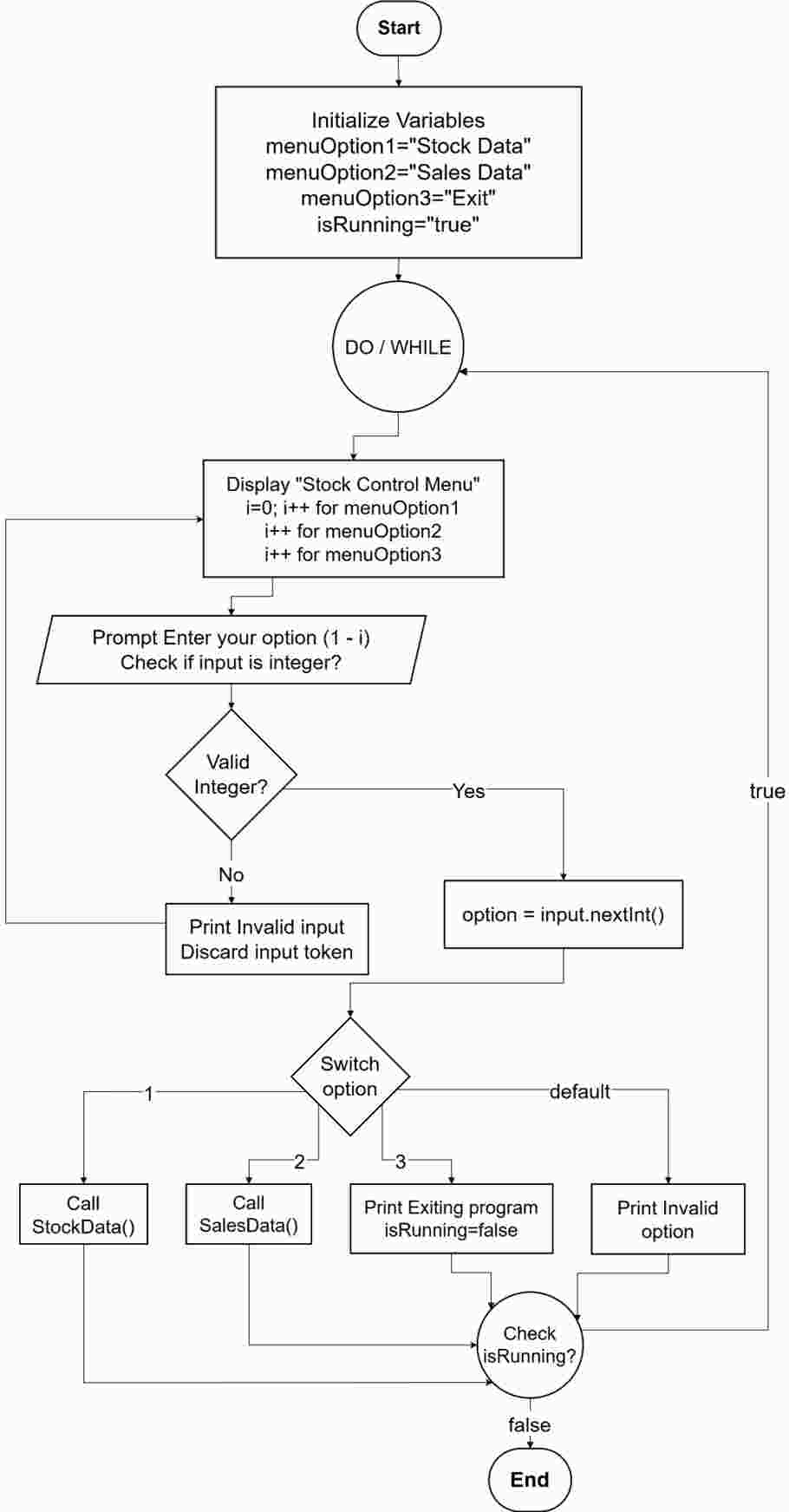
Figure 1: Flowchart Task 1
Output
Selecting option 1
Selecting option 2
Selecting option 3
Visit our Programming Assignment Help service to receive expert support for coding, debugging, documentation, and software development assignments.
Programming Assignment Help UK Harvard ReferencingTask 2: Entering Stock Data
The StockData () subroutine allows the user to input ten values for the six holder arrays. To be more specific; it requires the user to input item codes for each product, current stock, procurement cost per each product/unit, selling price per each product/unit, low stock alert and the re-ordering quantity for each of the products. Every input undergoes data type and value range check in order to validate them properly.
Pseudocode
The pseudocode outlines the iterative entry of stock data for ten items. The system also allows only integer and floating-point values to be accepted only within a certain range, so there are no problems with the format. With the information of stock details, the program then sums the products of the stock levels and unit costs to find the total stock value.
FUNCTION StockData()
// Define the maximum number of items allowed
CONSTANT MAX_ITEMS = 10
// Declare fixed-size arrays to store stock information for each item
DECLARE itemCode[0..MAX_ITEMS-1] as String
DECLARE stockLevel[0..MAX_ITEMS-1] as int
DECLARE unitCost[0..MAX_ITEMS-1] as double
DECLARE unitPrice[0..MAX_ITEMS-1] as double
DECLARE threshold[0..MAX_ITEMS-1] as int
DECLARE reorderQty[0..MAX_ITEMS-1] as int
// Loop through each item to collect stock details
FOR i from 0 to MAX_ITEMS - 1 DO
PRINT "Enter details for item " + (i + 1) + ":"
// Input item code
PRINT "Enter item code: "
INPUT itemCode[i]
// Get stock level with validation (must be non-negative integer)
WHILE input is not a valid integer OR input < 0 DO
PRINT "Invalid input. Enter a non-negative integer for stock level:"
DISCARD invalid input
END WHILE
SET stockLevel[i] = input integer
// Get unit cost with validation (must be positive number)
WHILE input is not a valid number OR input ≤ 0 DO
PRINT "Invalid input. Enter a positive number for unit cost:"
DISCARD invalid input
END WHILE
SET unitCost[i] = input number
// Get unit price with validation (must be positive number)
WHILE input is not a valid number OR input ≤ 0 DO
PRINT "Invalid input. Enter a positive number for unit price:"
DISCARD invalid input
END WHILE
SET unitPrice[i] = input number
// Get threshold with validation (must be non-negative integer)
WHILE input is not a valid integer OR input < 0 DO
PRINT "Invalid input. Enter a non-negative integer for threshold:"
DISCARD invalid input
END WHILE
SET threshold[i] = input integer
// Get reorder quantity with validation (must be non-negative integer)
WHILE input is not a valid integer OR input < 0 DO
PRINT "Invalid input. Enter a non-negative integer for reorder quantity:"
DISCARD invalid input
END WHILE
SET reorderQty[i] = input integer
END FOR
// Calculate total cost of stock (sum of stockLevel[i] * unitCost[i] for each item)
SET totalCost = 0.0
FOR i from 0 to MAX_ITEMS - 1 DO
totalCost = totalCost + (stockLevel[i] * unitCost[i])
END FOR
// Display the total cost of the stock
PRINT "The total cost of stock is: " + totalCost
// Return control to the main menu
RETURN to main menu
END FUNCTION
Flowchart
The flowchart demonstrates how the system has ten items that it cycles through, asks the user to input any detail on any stock, and the inputs are checked for validity before being stored in the desired arrays. Once every product has been entered the program total the total stock cost for all products and show the result to the user.
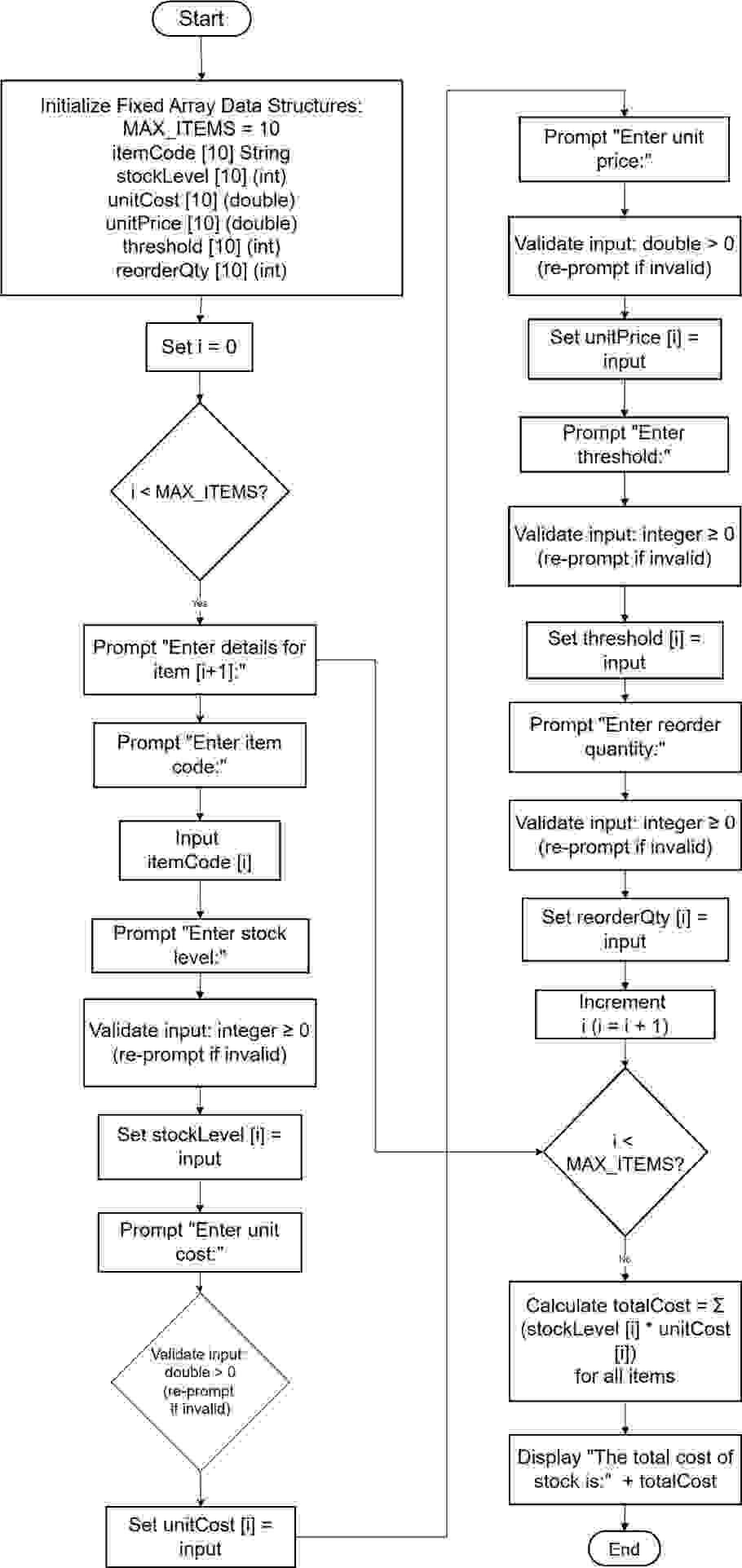
Figure 2: Flowchart Task 2
Output
Task 3: Entering Sales Data and Generating Reorder List
The SalesData() function works on the Sales Table of the database by allowing users to put in an integer value representing the item ID and another integer value which is the quantity that was sold. The program also seeks into the specified item, changes the stock availability and computes for the total sales earnings. When an item is less than its reorder point, then it is placed in the reorder point list; an indication of the reorder is made along with calculation of total reorder value.
Pseudocode
The pseudocode indicates that the users enter data records of the sales item by its ID and the quantity sold respectively. It checks the correctness of item IDs, changes stock quantities and gives a total of the sales. In the case of absence of an item ID, an error message is produced, and the program proceeds to the next record.
FUNCTION SalesData()
// Prompt the user to enter sales records
PRINT "Enter sales records (type 'done' as item ID to finish):"
SET totalSales = 0.0 // Initialize total sales amount
// Start an infinite loop to process multiple sales entries
WHILE true DO
// Prompt for the item ID or 'done' to finish
PRINT "Enter item ID (or 'done' to finish):"
INPUT salesId
// Check if the user wants to finish entering sales
IF salesId equals "done" THEN
BREAK out of loop // Exit the loop
END IF
// Prompt for the quantity sold, validate that it is a non-negative integer
PRINT "Enter quantity sold for item " + salesId + ":"
WHILE input is not a valid integer OR input < 0 DO
PRINT "Invalid input. Please enter a non-negative integer for quantity sold."
DISCARD invalid input
END WHILE
SET qtySold = input integer
// Attempt to find the index of the sold item in the stock data using item ID
SET index = findIndex(itemCode, salesId)
// If item is not found, notify user and skip this record
IF index equals -1 THEN
PRINT "Item ID not found. Record skipped."
ELSE
// Calculate sales amount and update total sales
totalSales = totalSales + (qtySold * unitPrice[index])
// Update the stock level by subtracting the quantity sold
stockLevel[index] = stockLevel[index] - qtySold
END IF
END WHILE
// Display the total sales amount
PRINT "The total sales amount is: " + totalSales
// Generate and display the reorder list for items below their threshold
SET totalReorderCost = 0.0 // Initialize total reorder cost
PRINT "Reorder List:"
PRINT " # | Item | Current Level | Threshold | Reorder Qty | Unit Cost | Subtotal"
SET counter = 1 // Initialize counter for reorder list numbering
// Check each item in stock to see if it needs reordering
FOR i from 0 to MAX_ITEMS - 1 DO
IF stockLevel[i] < threshold[i] THEN
// Calculate the cost of reordering this item
SET reorderCost = reorderQty[i] * unitCost[i]
// Print reorder details for this item
PRINT counter, itemCode[i], stockLevel[i], threshold[i], reorderQty[i], unitCost[i], reorderCost
// Add this item's reorder cost to the total reorder cost
totalReorderCost = totalReorderCost + reorderCost
// Increment reorder list counter
counter = counter + 1
END IF
END FOR
// Print the total cost of reordering all required items
PRINT "Total reorder cost = " + totalReorderCost
END FUNCTION
Flowchart
Flowchart illustrates the concept of how the program checks the validity of input, changes the quantity of the product and decides if an item needs to be reordered. Products or services whose values are below the threshold value have tick marks besides them, then Reorder computations are done.
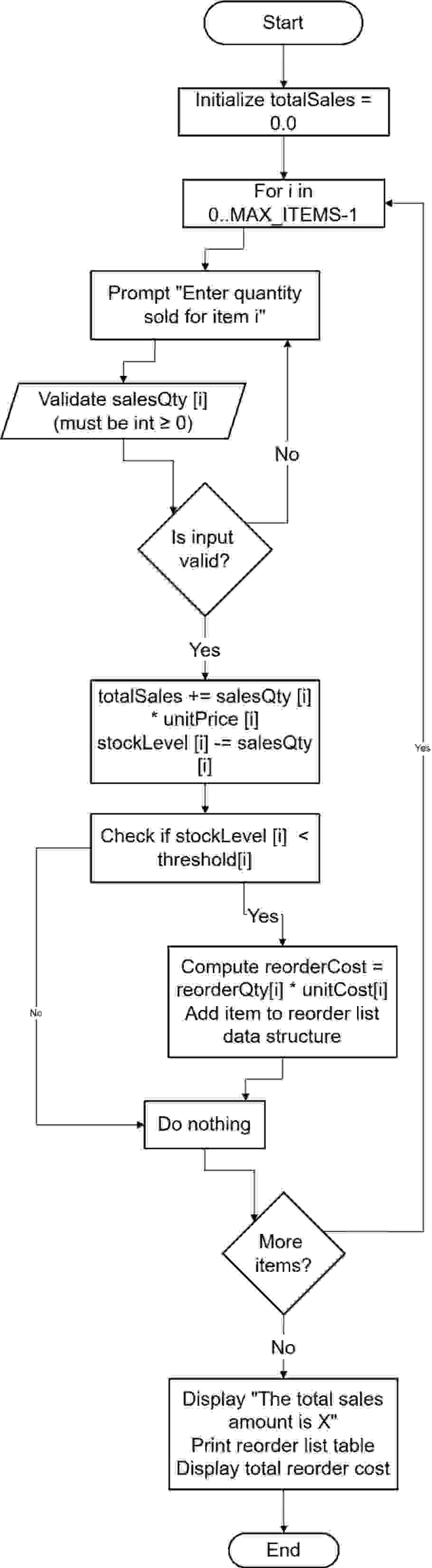
Figure 3: Flowchart Task 3
Output
Testing and Validation
The system was thoroughly checked to make sure that all the functionalities of the microprocessor worked efficiently. Some tests on the menu involved entering right and wrong items which were checked to see how the wrong items were handled. Consequently, StockData() function was experimented with different results regarding the inability of the inputs to populate the struct and the successful content delivery of valid stock details. For testing SalesData() function, different item IDs and sales quantities were used and it was ensured that the stock is updated proficiently and the Reorder List is created when required. The last step involved the final integration of the system to ascertain that data compatibility is maintained within the different function calls as well as that the sales transactions record instantaneously update the stock database.
Challenges and Future Improvements
One of the crucial issues was to preserve the stock data from being lost when passing between the function calls. This was done by employing static arrays which enable storage of data throughout the operations of the program. One of the issues was the quite complex input validation for which the solution was the creation of methods for integer and float inputs validation. To begin with, the SalesData() function used to accept sales data in a sequential method, but later modifications were made to accept item numbers directly, hence enhancing its flexibility.
Conclusion
The stock control system does incorporate the planned menu-driven stock management system where the users are able to input the details of stock, record the sales activities, and automatically generate the reordering list. They include features such as input validation for accurate data entry, validating data consistency to reduce data entry errors, and continuous updating of the stock status on the computer, which makes the program efficient. As has been seen, modularity reduces code complex density and readability thus making it easy to debug and maintain the program. Subsequently, testing of the stock data entry observation as well as the sales processing and the reorder amount calculation were also done and passed. The program could be improved with features for data storage and that incorporates a GUI, but in any case, the presented program allows to meet the needs for structured stock management.
References
Journals
- Aung, S.T., Funabiki, N., Syaifudin, Y.W., Kyaw, H.H.S., Aung, S.L., Dim, N.K. and Kao, W.C., 2021. A proposal of grammar-concept understanding problem in Java programming learning assistant system. J. Adv. Inform. Tech.(JAIT), 12(4).
- Brown, N.C., Weill-Tessier, P., Sekula, M., Costache, A.L. and Kölling, M., 2022. Novice use of the Java programming language. ACM Transactions on Computing Education, 23(1), pp.1-24.
- Chiodini, L., Moreno Santos, I., Gallidabino, A., Tafliovich, A., Santos, A.L. and Hauswirth, M., 2021, June. A curated inventory of programming language misconceptions. In Proceedings of the 26th ACM Conference on Innovation and Technology in Computer Science Education V. 1 (pp. 380-386).
- Christopher, L. and Waworuntu, A., 2021. Java programming language learning application based on octalysis gamification framework. IJNMT (International Journal of New Media Technology), 8(1), pp.65-69.
- Christopher, L. and Waworuntu, A., 2021. Java programming language learning application based on octalysis gamification framework. IJNMT (International Journal of New Media Technology), 8(1), pp.65-69.
- Horstmann, C.S., 2024. Core java, volume I: fundamentals. Pearson Education.
- J Eck, D., 2021. Introduction to programming using Java. Hobart and William Smith Colleges.
- Lumba, E. and Waworuntu, A., 2021. Implementation of Model View Controller Architecture in Object Oriented Programming Learning. IJNMT (International Journal of New Media Technology), 8(2), pp.102-108.
- qizi Sharopova, M.M., 2023. INTRODUCING" PROGRAM CONTROL OPERATORS" IN THE JAVA PROGRAMMING LANGUAGE. Multidisciplinary Journal of Science and Technology, 3(5), pp.222-231.
Go Through the Best and FREE Samples Written by Our Academic Experts!
Native Assignment Help. (2026). Retrieved from:
https://www.nativeassignmenthelp.co.uk/com4011-introduction-to-programming-assignment-sample-45847
Native Assignment Help, (2026),
https://www.nativeassignmenthelp.co.uk/com4011-introduction-to-programming-assignment-sample-45847
Native Assignment Help (2026) [Online]. Retrieved from:
https://www.nativeassignmenthelp.co.uk/com4011-introduction-to-programming-assignment-sample-45847
Native Assignment Help. (Native Assignment Help, 2026)
https://www.nativeassignmenthelp.co.uk/com4011-introduction-to-programming-assignment-sample-45847
- FreeDownload - 39 TimesUnit 503 Wider Professional Practice and Development in Education and Training
Wider Professional Practice and Development in Education and...View or download
- FreeDownload - 37 TimesCMA4000: Introduction to Law and Statutory Requirements Assignment Sample
Introduction In the United Kingdom, the “construction industry” is...View or download
- FreeDownload - 39 TimesPatient Assessment Assignment Sample
Patient Assessment Assignment Sample Q1: History Taking Don’t let...View or download
- FreeDownload - 43 TimesU3.14 Observation Skills Task Assignment Sample
Introduction to Observation Skills Task Assignment Sample Observation task is...View or download
- FreeDownload - 40 TimesBusiness And Business Environment Assignment
Introduction - Business And The Business Environment Admiral Sportswear is a...View or download
- FreeDownload - 43 TimesLevel 3 in Adult Care Assignment Sample
Importance of Health and Well-being 1.1 Relationship between identity, self-...View or download
-
100% Confidential
Your personal details and order information are kept completely private with our strict confidentiality policy.
-
On-Time Delivery
Receive your assignment exactly within the promised deadline—no delays, ever.
-
Native British Writers
Get your work crafted by highly-skilled native UK writers with strong academic expertise.
-
A+ Quality Assignments
We deliver top-notch, well-researched, and perfectly structured assignments to help you secure the highest grades.