Introduction
In this report, multiple programs in C Sharp have been implemented, and two of which are console-based and the other is windows form based. The tasks cover elements including conditional statements, loops, user authentication, forms and data structures like lists. There are attachments demonstrating the form of the pseudocode, flowcharts, general theory, and the detailed implementation for each of them.
Part 1
Task 1: Speed Limit Checker
In this task, decision structures, particularly if-else and nested if, are deployed in order to come up with the right message based on the user’s speed. Conditional statements provide the capability of selecting various parts of the code to run depending on certain conditions (Microsoft.com, 2025).
Pseudocode
Start
Input speed
If speed > 80
Print "Lose License"
Else if speed >= 70 AND speed <= 80
Print "3-6 points on license"
Else if speed >= 60 AND speed < 70
Print "Caution"
Else
Print "Within speed limit"
End
Flowchart

Figure 1: Flowchart for speed limit checking
Implementation & Explanation
In the case of accepting input from the user in terms of speed, the program implements the use of nested if statements. If the speed goes beyond 80, it gives the message “Lose License.” For the speeds between 70 to 80 it provides 3-6 points of license. If the speed is between 60-70, then the vehicle user receives a caution message of the current speed. Otherwise, it affirms that the acquired speed is within the limit (W3schools.com, 2025). The explicit implementation brings out logical conditions in order to classify something and also brings out clear patterns of decisions. Like explained above, this method proves viable in handling conditional outputs with the numeral input.
Screenshot of the Code
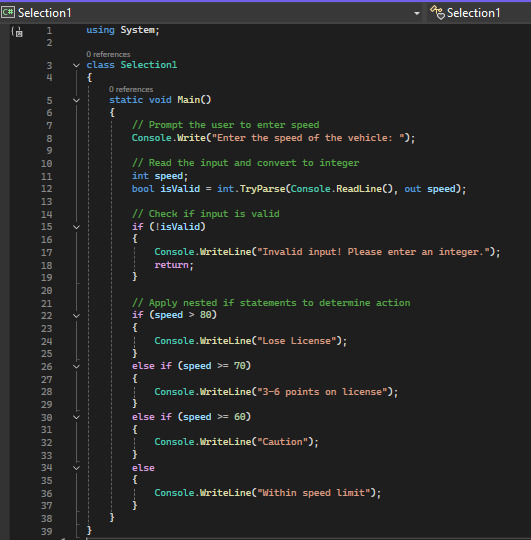
Figure 2: Screenshot of the code for speed limit checking
Task 2: Finding the Largest Integer
Generally, the identification of the largest number is done by using the comparison operators as well as nested if. The logical actions involve making comparisons of three different numbers in order to make an assessment on which of them is the greatest (GeeksforGeeks, 2018).
Pseudocode
Start
Input num1, num2, num3
If num1 > num2 AND num1 > num3
Print num1 is largest
Else if num2 > num1 AND num2 > num3
Print num2 is largest
Else
Print num3 is largest
End
Flowchart
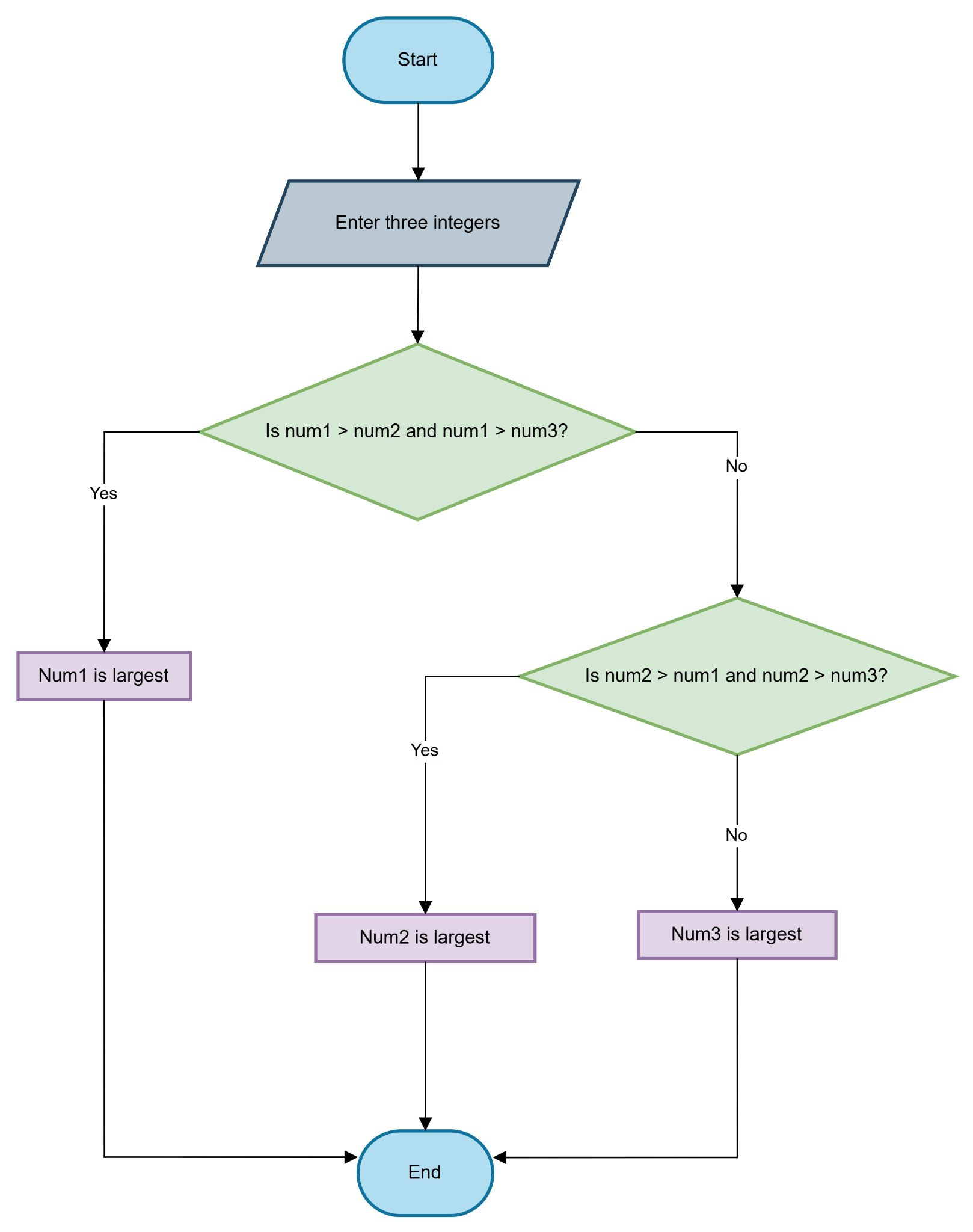
Figure 3: Flowchart for finding the largest integer
Implementation & Explanation
This program is used to enter three numbers from the keyboard and then compare these numbers using nested if conditions to identify the biggest of them. The first condition sets the first number greater than the second number and the third number as well. If not, the second condition examines if the second number is the largest. If none of the conditions is true, then the third number would be the greatest number by default (Sanfoundry, 2012). It is because of this structured comparison method that the results yielded are always accurate. The implementation also employs the comparison, logical AND operators to enable the assessment of the highest value from the inputs.
Screenshot of the Code
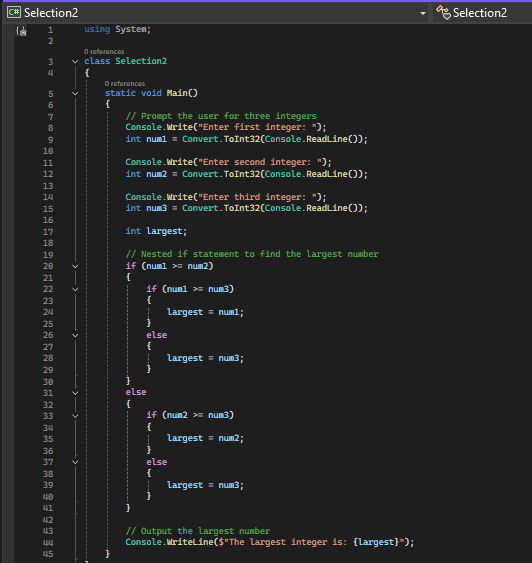
Figure 4: Screenshot of the code for finding the largest integer
Task 3: Grade Evaluation System
This program uses the switch statement, which is the better option for such cases instead of if-else when comparing multiple discrete values (Techaltum.com, 2025).
Pseudocode
Start
Input marks
Switch(marks)
Case 70-100: Print "A - Passed"
Case 60-69: Print "B - Passed"
Case 50-59: Print "C - Passed"
Case 40-49: Print "D - Failed, Resit Required"
Case 30-39: Print "E - Failed, Resit Required"
Case <30: Print "F - Failed, No Resit"
Default: Print "Invalid input"
End
Flowchart

Figure 5: Flowchart for grade evaluation system
Implementation & Explanation
This program is a function that takes a numeric value or score as a parameter and returns a letter equivalent to a grade A-F based on the switch statement. Preliminary scores above 70 and up to 100 are denoted as an “A” with the deteriorating grades from B to F where appropriate numbers are chosen. Grades D and E mean fail with a possibility of doing a resit examination while F means fail and prohibitively does not allow any chance of doing a resit examination (GeeksforGeeks, 2021). An exception case deals with improper entries while handling a particular kind of data. Switch statements are far better to implement than many if-else conditions; it adds clarity and flexibility in the code in case new cases are to be added in the future.
Screenshot of the Code
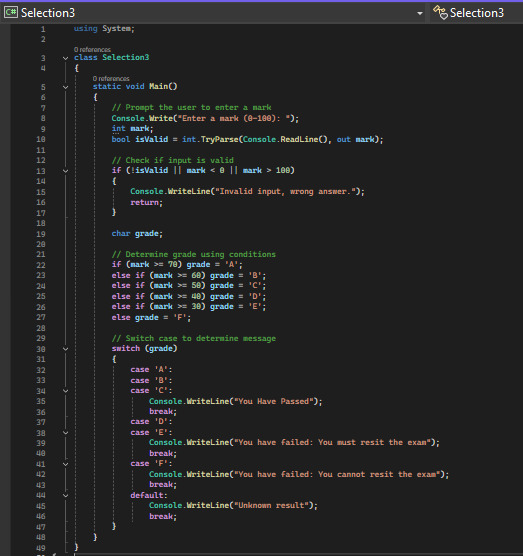
Figure 6: Screenshot of the code for grade evaluation system
Part 2
Task 1: Basic Access Control System
The development of this task needs windows form, multiple forms, use of click events for the forms and form navigation, and users’ authentication (Hadiya, 2020).
Pseudocode
Start
Display Login Form
If User clicks "New User Register"
Open Registration Form
If Registration Successful
Close Registration and Open Login
If Login Successful
Open Student Record System
Else
Show Error Message
End
Flowchart
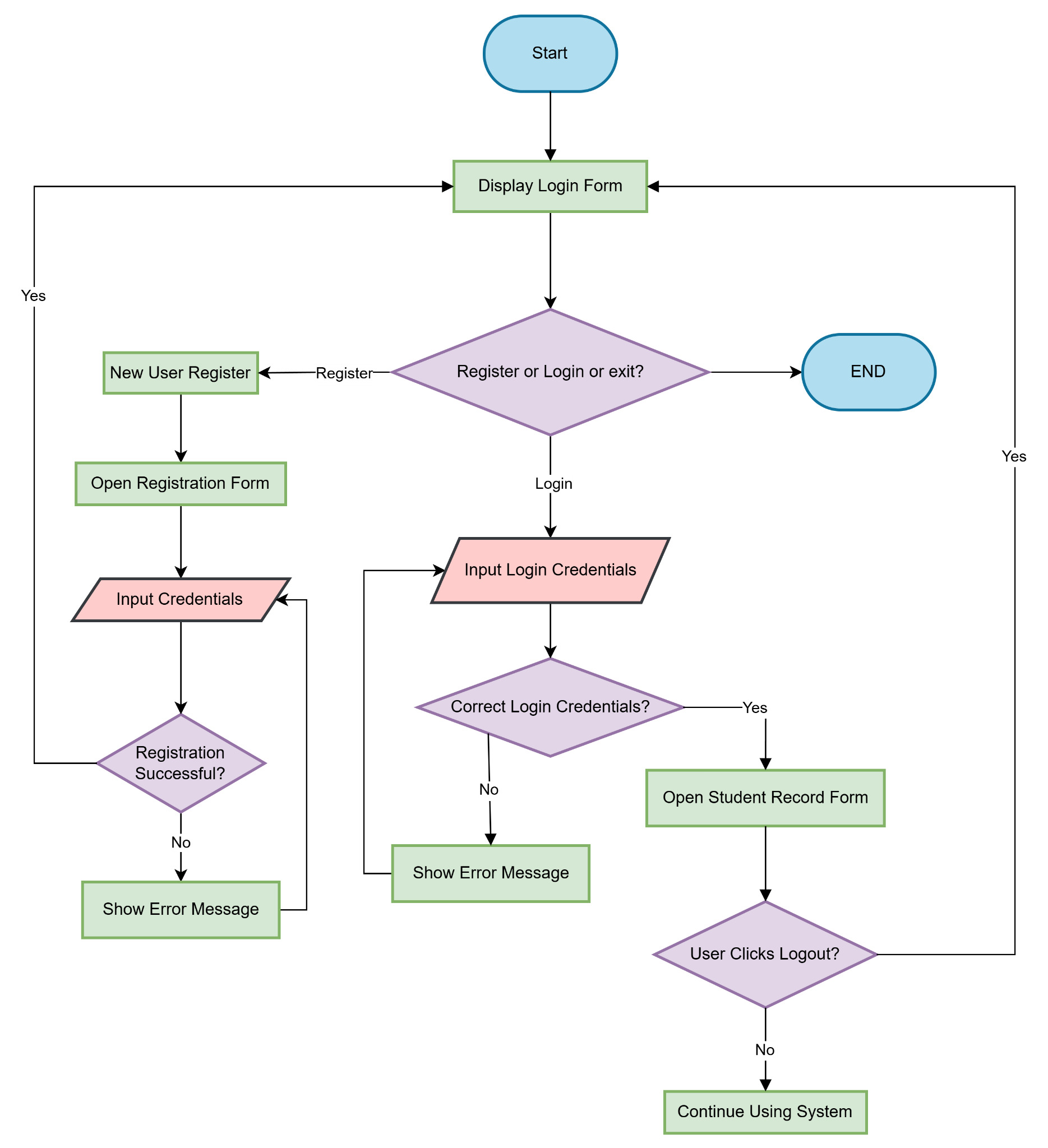
Figure 7: Flowchart for speed limit checking
Implementation & Explanation
This includes the Login Form, the Registration Form and the Student Record Form. The login window promotes the concept of users providing their username and a secret password, which is considered for identification purposes for the already registered users. If the entered credentials are invalid, the user gets an appropriate error message displayed. If the user is a new one, the “New User Register” button leads the user to the registration window where the account details are developed. Depending on the type of the input, the matrix of the green crosses is followed by the new registration form, then the login form is available again for the user (CodeCraks, 2020). Another action is a logout button through which the users can log out from the system. These include event handling, moving from one form to another and error handling for the proper run of the implementation.
Screenshot of the Code


Figure 8: Screenshot of the code for the login page

Figure 9: Design of login page

Figure 10: Screenshot of the code for the register page

Figure 11: Design of register page

Figure 12: Screenshot of the code for the welcome page

Figure 13: Design of welcome page
Task 2: Teacher Record System
This program utilizes Windows Forms, one of the forms of GUI, ListView to display the clothes and a masked textbox for users’ data entry. It works with lists, form controls, and arithmetic operations for basic additions, subtractions and others.
Pseudocode
Start
Display Welcome Form
If User Clicks "Enter System"
Open Teacher Record System
Allow user to Add, Remove, Calculate Average, and Clear Salary Data
If Exit Clicked
Close Application
End
Flowchart
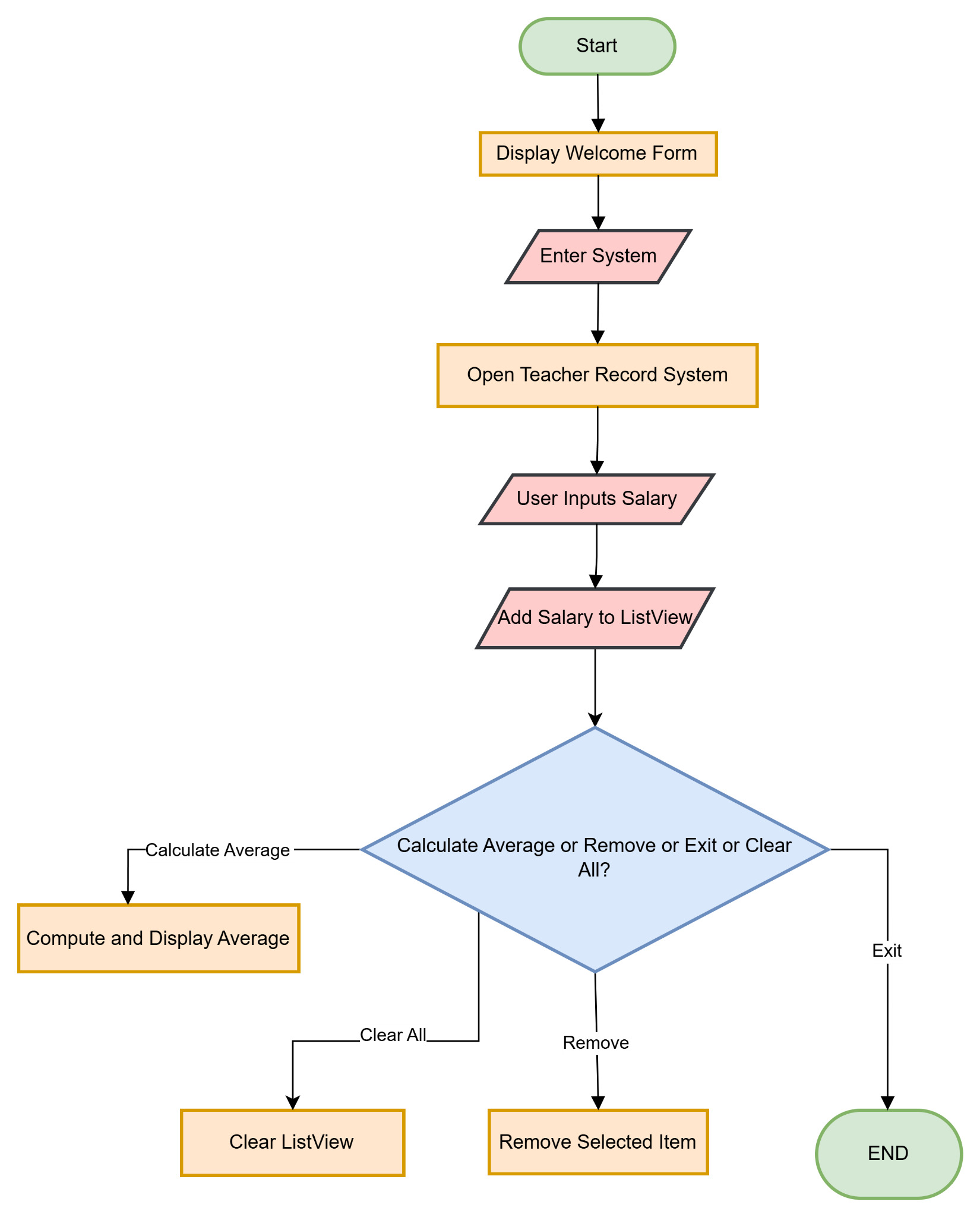
Figure 14: Flowchart for speed limit checking
Implementation & Explanation
This program consists of a Welcome Form and a Teacher Record Form that will allow the user to input, delete, and reset salaries, as well as get the average salary. A ListView to store the entered salaries and a MaskedTextbox will only allow 9 to 9 numbers with decimal points to be entered. After entering the data, the result can be calculated when clicking the “Calculate Average” button. The “Clear List” button clears all the entered data, and the “Exit prog” button closes the program (Acharya, 2024). It also enables error checks for the improper inputs and gives the button-based operations for better user-friendly and data presentation.
Screenshot of the Code
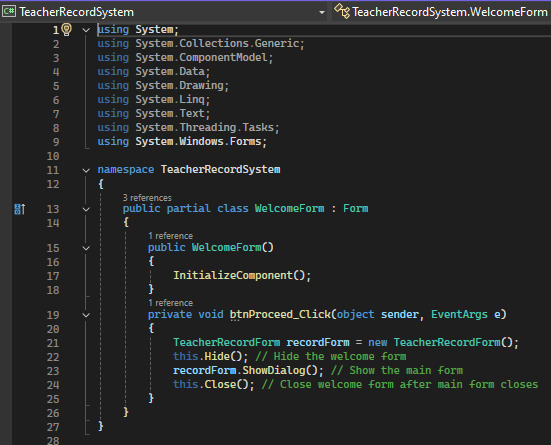
Figure 15: Screenshot of the code for the welcome page of teacher record system
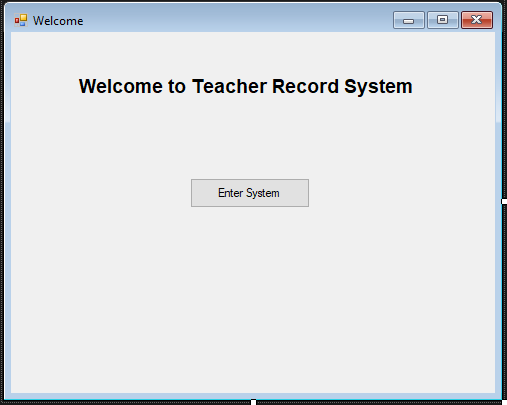
Figure 16: Design of welcome page


Figure 17: Screenshot of the code for the teacher record system page
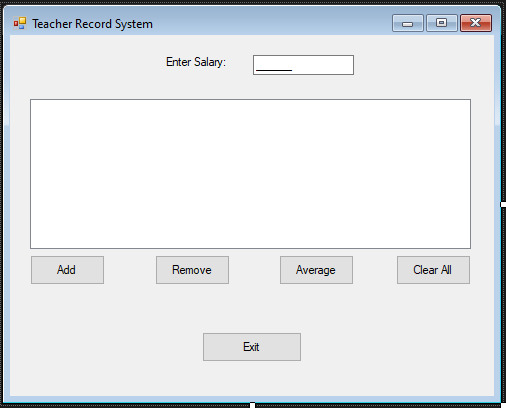
Figure 18: Design of Teacher Record page
Task 3: Personal Reflection
The process of solving this assignment was rather beneficial for me since it allowed me to enhance my knowledge of programming and problem-solving skills. The project aimed at: using conditional statements, loops, and event handling, etc., developing a Windows form application in C #. One of the main concepts that I have learned was how to implement the user authentication systems as well as the dynamic teacher record system, which enhanced my understanding of data validation, UI design and ListView.
One of the main difficulties that I met during the work was related to the navigational functionality when switching between the login, registration, and main forms. I resolved this by optimising the form’s availability to accomplish this and make it friendly for users. The other issue was on how to check for errors when wrong entries were input for the program to halt or crash. I also used try-catch blocks as well as validating the inputs from the user to have a reliable program.
In general, this type of approach has a useful impact on my overall logical thinking, the ways of debugging the program and event driven programming as well. This has brought me to the edge of learning further applications of C# and has built me confidence in the development of realistic software.
If you are working on similar projects and need expert guidance, Native Assignment Help provides reliable support for C# programming tasks. Their professional team ensures high-quality solutions, making your learning journey easier. Students can also access specialised Assignment Help for coding, debugging, and application development.
References
Acharya, K., 2024. Teacher record management system project report.
CodeCraks, 2020. How to Create Complete Login and Registration System (Multiple Accounts) in C# 2020 | C# Tutorial. [online] YouTube. Available at: https://www.youtube.com/watch?app=desktop&v=IzpnHUo6iAI&t=0s [Accessed on: 8 Feb. 2025].
GeeksforGeeks, 2018. C program to Find the Largest Number Among Three Numbers. [online] Available at: https://www.geeksforgeeks.org/c-program-to-find-the-largest-number-among-three-numbers/ [Accessed on: 8 Feb. 2025].
GeeksforGeeks, 2021. Program to Assign grades to a student using Nested If Else. [online]. Available at: https://www.geeksforgeeks.org/program-to-assign-grades-to-a-student-using-nested-if-else/ [Accessed on: 8 Feb. 2025].
Hadiya, Y. 2020. Create Login(Sign In) and Registration (Sign Up) Form in C# Windows Form With Database. [online] Available at: https://www.yogeshhadiya.in/2020/09/create-login-and-registration-form-in-c-sharp-.html#:~:text=Right%20click%20on%20solution%20name,Home%20page%20in%20same%20way. [Accessed on: 8 Feb. 2025].
Microsoft.com, 2025. Tutorial: Create a simple C# console app - Visual Studio. [online] Available at: https://learn.microsoft.com/en-us/visualstudio/get-started/csharp/tutorial-console?view=vs-2022 [Accessed on: 8 Feb. 2025].
Sanfoundry, 2012. Largest of Three Numbers in. [online] Available at: https://www.sanfoundry.com/c-program-biggest-3-numbers/ [Accessed on: 8 Feb. 2025].
Techaltum.com, 2025. C program to find grade of a student code example. [online] Available at: https://tutorial.techaltum.com/c-program-to-find-grade-of-a-student.html [Accessed on: 8 Feb. 2025].
W3schools.com, 2025. W3Schools.com. [online] Available at: https://www.w3schools.com/cs/cs_user_input.php [Accessed 8 Feb. 2025].
Go Through the Best and FREE Samples Written by Our Academic Experts!
Native Assignment Help. (2026). Retrieved from:
https://www.nativeassignmenthelp.co.uk/ctf3201-programming-assignment-project-report-45999
Native Assignment Help, (2026),
https://www.nativeassignmenthelp.co.uk/ctf3201-programming-assignment-project-report-45999
Native Assignment Help (2026) [Online]. Retrieved from:
https://www.nativeassignmenthelp.co.uk/ctf3201-programming-assignment-project-report-45999
Native Assignment Help. (Native Assignment Help, 2026)
https://www.nativeassignmenthelp.co.uk/ctf3201-programming-assignment-project-report-45999
- FreeDownload - 44 TimesDiscuss How Work Defines Us In The UK And The Changes To The Working Practices Overtime Since The Industrial Revolution Assignment Sample
Introduction - Discuss How Work Defines Us In The UK And The Changes To...View or download
- FreeDownload - 40 TimesHealthcare Industry Innovation Assignment Sample for Students
Innovation in Healthcare Industry Assignment {{TEXT2}} Introduction -...View or download
- FreeDownload - 41 TimesM-615-3826 Person-Centred Care Assignment Sample
Introduction to Person-Centred Care Assignment Sample Person centred care is...View or download
- FreeDownload - 43 TimesUK Media Coverage Dissertation
How Does UK Media Coverage Of International Students' Migration Compare To That...View or download
- FreeDownload - 40 TimesCommunity-Based Healthcare Initiatives Assignment Sample
Theories and Benefits of Community-Based Healthcare Initiatives Introduction...View or download
- FreeDownload - 39 Times5006MKT Consumer Behaviour Assignment Example
Introduction - 5006MKT Consumer Behaviour For every business, consumers are...View or download
-
100% Confidential
Your personal details and order information are kept completely private with our strict confidentiality policy.
-
On-Time Delivery
Receive your assignment exactly within the promised deadline—no delays, ever.
-
Native British Writers
Get your work crafted by highly-skilled native UK writers with strong academic expertise.
-
A+ Quality Assignments
We deliver top-notch, well-researched, and perfectly structured assignments to help you secure the highest grades.