Introduction
Computers are an indispensable aspect of today's world, which underpins many aspects of life. From healthcare and education to industries and communication, they enable unprecedented scales of operations and innovations. However, understanding the foundational principles behind computing systems is crucial for effective use and responsible practices. This information book offers employees a better understanding of computer systems, their characteristics of hardware and software, and ethical and legal issues associated with computing. Thus, once employees learn this knowledge, they will better apply technology to their duties effectively and responsibly.
Functions of a Computer System
The four basic functions within any computer system are input, processing, storage, and output. These functions all collaborate to make the interaction from the user to the machine smooth and effective in handling and making decisions.
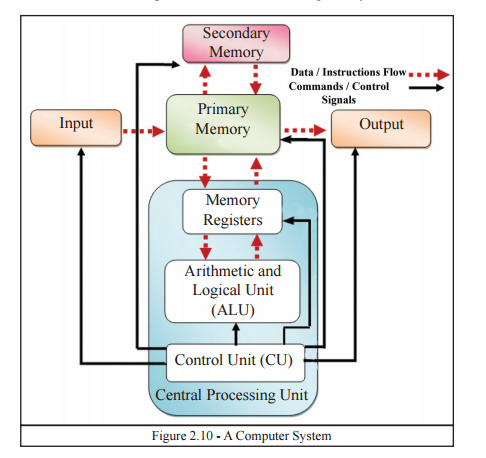
Figure 1: Functions of a Computer System
Input
Input is a basic function of any computer system because it collects data or commands that the system processes to give meaningful output. This data may come from different input devices, each designed for a particular task and environment. For instance, keyboards are common for text input, allowing users to write documents, code, or even communicate through email and messaging apps. Mouse enable one to navigate and interrelate on graphical user interfaces to select, drag, and drop with precision. In addition to conventional peripherals, input space has been expanded by high-quality sensors, primarily in the field of application. Sensors which are capable of measuring temperature, humidity and pressure are important in scientific analysis in science, farming and smart homes (Englander and Wong, 2021). Scanners take printed contents and transform them into digital ones. The input phase deserves attention since it sets the overall foundation for the further computations, guarantees data arrives at the system and is ready for further computations and decision making.
Processing
Processing is a significant phase in the functioning of a computer system. The raw input data is transformed into useful information. At the core of this operation lies the Central Processing Unit, often referred to as the "brain" of the computer. The CPU performs a series of instructions generated by software applications. Its range of operations includes arithmetic calculations, logical comparisons, and sorting data. These are all essential for running applications, report generation, or even performing simulations and real-time decision-making tasks (Hamacher and Vranesic, 2022). The CPU is made up of several components, including the Arithmetic Logic Unit (ALU), which performs mathematical and logical operations, and the Control Unit (CU), which controls data flow and instruction sequencing.
Storage
Storage is an integral part of computer systems, capable of holding data for temporary or permanent use. It is a guarantee of continuity in operations since information can be kept and retrieved when needed. Memory storage is separated into Cache memory and NonCache memory. RAM or any other type of volatile memory is memory that stores information in the meantime when the system processes it. This is fast and is important for carrying out applications and responsibilities however, it is temporary and erased when the power is shut off. There are non-volatile storage options, such as HDDs, SSDs, and optical media that are made to maintain data for longer periods of time (Guo et al., 2022). SSDs also happen to be faster at accessing data and more durable than the traditional HDDs. Cloud storage has also emerged as a commonly used alternative, allowing accessing files remotely and not always depending on physical devices. Proper storage solutions ensure reliability and accessibility while making the handling of critical data efficient.
Output
Output is the final stage in computing processing and converts processed data into forms readable and manipulable for users. The diversity of output devices is large enough to meet the demands of a wide range of users who interpret digital signals in visual, auditory, or even physical forms. The most widely used output device is monitors that depict text, graphics, and video in real-time. Printers produce physical documents and photographs based on digital ones, filling a gap within the media which is part digital and partly tangible. Digital audio files play through a speaker or headset, interpreting the digital to produce something audible, used for access, communication, and reception (Xiao et al., 2021). Special output devices will include 3D printers, which move into manufacturing and prototyping. The output function ensures that such computational results are in turn accessible, understandable, and actionable so that users can fruitfully interact with technology and tap into the power of computing in practical, real-world applications.
Types, Purposes, and Characteristics of Computer Hardware
Computer hardware refers to those physical parts that a computer uses for its functioning. These parts work together to perform commands and serve the user's purpose. The understanding of each part's function and role is critical for getting the most out of a system and its maintenance.
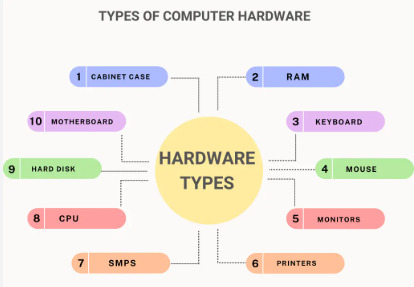
Figure 2: Hardware Types
Central Processing Unit (CPU)
The CPU executes instructions and performs calculations. It comprises two major units: the Arithmetic Logic Unit (ALU) performs mathematical and logical operations and the Control Unit (CU) directs the flow of instructions (Dahiya, 2024). Modern CPUs also consist of cache memory, used to store frequently accessed data, decreasing access times and improving performance.
Memory
Devices used to store data temporarily or permanently are called memory. Random Access Memory is a type of short-term storage that allows fast access to data during active processes. Read-Only Memory stores firmware, which is important for booting up the system. Non-volatile memory devices include SSDs and HDDs, which are used for long-term storage of files and applications.
Input and Output Devices
Input devices are keyboards, Mouse, and scanners, which allow the user to interact with the computer. Output devices include monitors, printers, and speakers, which display processed data in a human-friendly format. These peripherals therefore help to fill the gap between humans and machines and improve usability and accessibility.
Motherboard and Other Components
The motherboard is the main connector that links all the hardware together and facilitates communication among all the components. The ports, sockets, and slots for the CPU, memory, and storage devices are located within the motherboard. Other components such as the power supply and cooling systems also ensure that it runs dependably and efficiently (Sharma and Tiwari, 2021). Today, hardware design innovations in computers continue to improve their speed, efficiency, and reliability, making it possible to handle complex demands by users.
Types and Purposes of Software
Software is the intangible part of computing which issues instructions to hardware. It comes into three categories: system software, application software, and development tools, all which do different things.
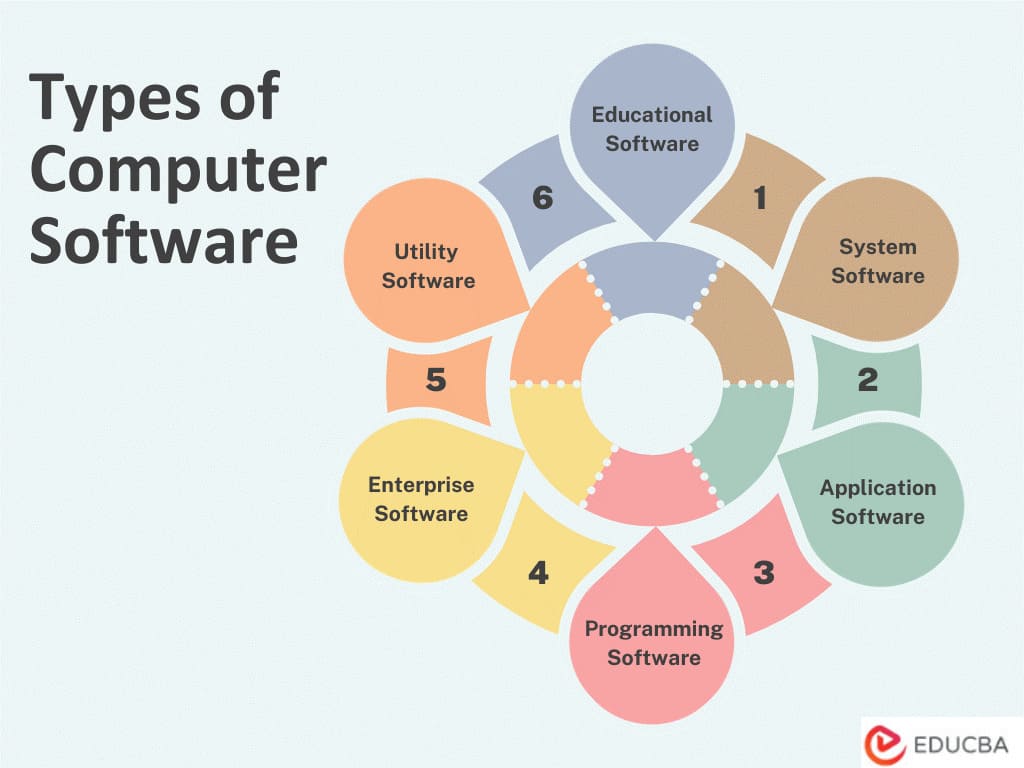
Figure 3: Software Types
System Software
System software is made of core programs, which include an operating system such as Windows, Linux, or Mac OS, and utility programs, which manage and coordinate all hardware resources (Talati et al., 2021). An operating system is an intermediary tool that bridges the gap between users and hardware. Its tasks may include memory management, managing files, and handling device communications, and ensuring application programs are executed in a non-interruptive manner (Hu et al., 2020). Utility programs, including antivirus software and disk defragmenters, enhance system performance and security. They protect against malware and ensure that the system works effectively. System software is, therefore, very essential for maintaining the stability and functionality of computer systems.
Application Software
Application software is designed to help users perform certain tasks. Some of the best examples include word processors, such as Microsoft Word; spreadsheet software, such as Excel and web browsers, such as Google Chrome. These programs satisfy a wide range of needs, from document creation to data analysis, internet browsing, and even gaming. Each application serves a specific function, allowing users to achieve their objectives efficiently (Ounnas et al., 2021). This software, therefore, allows the individual or organization to perform tasks that utilize capabilities more elaborate than those solely offered by the operating system, thus boosting productivity and usability.
Programming Tools
Programming tools are specialized software that helps developers write, test, and debug code. Integrated Development Environments, such as Visual Studio and Eclipse, offer comprehensive platforms that integrate coding editors, debuggers, and compilers in one interface. This makes the development process much easier, allowing one to create, optimize, and troubleshoot software (Blind et al., 2021). Many of them are equipped with such useful functions as syntax highlighting, integration with version control as well as testing tools to enable developers write their excellent, efficient code. Development tools are extremely important for that way of making sure that applications work that way they should in various settings.
Ethical Issues Related to Computing
Such massive investment in application of computing technologies created big ethical issues. That, in turn, is pertinent in making certain that the problems are well handled when it comes to encouraging optimal utilization of the principles at hand without compromising others.
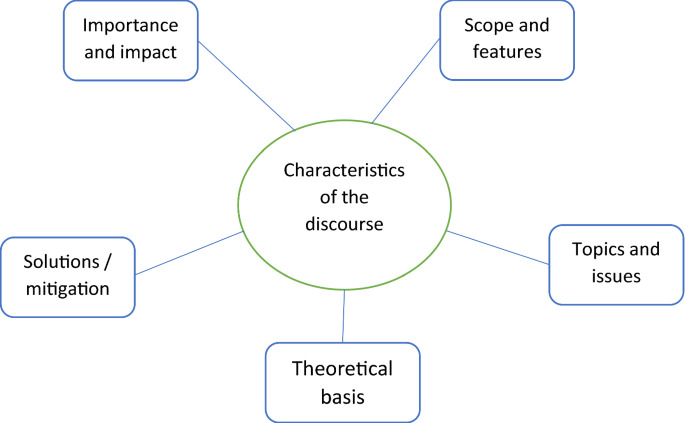
Figure 4: Ethical Issues Related to Computing
Privacy and Data Security
Data privacy becomes a crucial issue in the digital age because many organizations obtain user data and store it. These examples include illegitimate access, compromised data confidentiality, and abuse of personal information contravening user rights and diminishing confidence. Business enterprises should use physical and procedural security as well as make their data usage policies consensual.
Digital Divide
The concern of digital divide addresses inequity of use of technology amongst group of different socioeconomic status. Another effect of digital skills disparities increased pre-existing disparities while depriving learners, job-seekers, or economic participants of access to computers, the internet. Reducing this divide will hence be crucial for a way of inclusive development.
Algorithmic Bias
Algorithms used in hiring and lending decisions can inadvertently establish prejudices present in the training data. Counteracting this necessitates more careful design of algorithms coupled with constant monitoring for potential bias and lack of equality (Silvano et al., 2023). Ethical computing depends on a collaboration of producers, consumers, and authorities to ensure a computing infrastructure that respects rights and is mix with value.
Laws and Regulations Governing Computing
Laws and regulations play a crucial role in assuring proper usage of the computing technology and its security. Thus, they embrace issues about protection of data and cybersecurity issues.
Data Protection Laws
The EU General Data Protection Regulation (GDPR) sets stricter standards for gathering, storing, and making use of data. In this respect, it provides individuals with rights regarding their personal information, transparent and accountable data handling practices.
Cybersecurity Laws
The Computer Misuse Act of the UK, as well as the Cybersecurity Information Sharing Act in the US, is part of those laws that aim at preventing unauthorized access to a computer system and penalize anyone committing such an offense. They protect users as well as organizations from any threats.
Intellectual Property Laws
Copyright and patent laws ensure fair use of digital content and technologies while safeguarding the rights of creators and inventors. It fosters innovation but also safeguards the intellectual property. An organization should follow such laws for it to avoid the implications of law and retain the public's trust.
Cases of Law Enforcement against Unethical Use
Prominent examples of policing of unethical computing provide a good example of why there is need to ensure ethical and legal compliance.
Data Breaches
In 2020, several cyber criminals were arrested and prosecuted for conspiracy to perpetrate data breach affecting millions of users. It emphasized how weak the organizational security strategies were, and led to an increase in requiring strict legislation.
Ransomware Attacks
Attacks which include Ransomware in which attackers compress data then demand for money to unlock it and the incidents have caused a lot of loss of money and interruption of business (Hu et al., 2021). Police authorities have begun to enhance their crackdown on acts that fall under this category and ensure that culprits face the law, however, there is the need to prevent such occurrences.
Online Harassment
The incidences of cyber bullying/ harassment have led to legal consequences against the perpetrators thus making people conscious of their behavior. The above cases are examples that point to the ethics being accorded to computing technologies.
Conclusion
This report has provided a brief of the components of computer system, that is the hardware, the software, and the legal/ethical issues of Computer Systems. The improved knowledge about how computer systems work on simple concepts helps to solve various operational problems, and implement technologies in practice to increase the work efficiency and make correct decisions. Besides, it has stressed on information rights such as right to privacy, protection of information as well as right to fairness in computational processes. Thus, legally binding rules along with proper measures of security are indispensable for both the side of the organization and users. Ethical use of computing contributes greatly to ensure successful business trends together with an organizational culture of honoring ethical responsibility. Employees who take part in enhancing physical and social processes through understanding and practicing the above principles help the organization and the larger society in a technically and advanced way.
At Native Assignment Help, we understand the importance of mastering foundational concepts in computer systems. Whether you're struggling with understanding the functions of input, processing, storage, and output or need guidance on hardware and software, our expert writers offer tailored assignment help. Get top-notch solutions to boost your grades and enhance your knowledge of computer systems.
Reference List
Journals
Englander, I. and Wong, W., 2021. The architecture of computer hardware, systems software, and networking: An information technology approach. John Wiley & Sons.
Hamacher, C. and Vranesic, Z., 2022. Computer organization and embedded system. Tata McGraw Hill.
Guo, Z., Shan, Y., Luo, X., Huang, Y. and Zhang, Y., 2022, February. Clio: A hardware-software co-designed disaggregated memory system. In Proceedings of the 27th ACM International Conference on Architectural Support for Programming Languages and Operating Systems (pp. 417-433).
Xiao, Q., Zheng, S., Wu, B., Xu, P., Qian, X. and Liang, Y., 2021, June. Hasco: Towards agile hardware and software co-design for tensor computation. In 2021 ACM/IEEE 48th Annual International Symposium on Computer Architecture (ISCA) (pp. 1055-1068). IEEE.
Dahiya, S., 2024. Harnessing Cloud Computing for Enterprise Solutions: Leveraging Java for Scalable, Reliable Cloud Architectures. Integrated Journal of Science and Technology, 1(8).
Sharma, V. and Tiwari, A.K., 2021. A study on user interface and user experience designs and its tools. World Journal of Research and Review (WJRR), 12(6), pp.41-45.
Talati, N., May, K., Behroozi, A., Yang, Y., Kaszyk, K., Vasiladiotis, C., Verma, T., Li, L., Nguyen, B., Sun, J. and Morton, J.M., 2021, February. Prodigy: Improving the memory latency of data-indirect irregular workloads using hardware-software co-design. In 2021 IEEE International Symposium on High-Performance Computer Architecture (HPCA) (pp. 654-667). IEEE.
Hu, W., Chang, C.H., Sengupta, A., Bhunia, S., Kastner, R. and Li, H., 2020. An overview of hardware security and trust: Threats, countermeasures, and design tools. IEEE Transactions on Computer-Aided Design of Integrated Circuits and Systems, 40(6), pp.1010-1038.
Ounnas, D., Guiza, D., Soufi, Y. and Maamri, M., 2021. Design and hardware implementation of modified incremental conductance algorithm for photovoltaic system. Advances in Electrical and Electronic Engineering, 19(2), pp.100-111.
Blind, K., Böhm, M., Grzegorzewska, P., Katz, A., Muto, S., Pätsch, S. and Schubert, T., 2021. The impact of Open Source Software and Hardware on technological independence, competitiveness and innovation in the EU economy. Final Study Report. European Commission, Brussels, doi, 10, p.430161.
Silvano, C., Ielmini, D., Ferrandi, F., Fiorin, L., Curzel, S., Benini, L., Conti, F., Garofalo, A., Zambelli, C., Calore, E. and Schifano, S.F., 2023. A survey on deep learning hardware accelerators for heterogeneous hpc platforms. arXiv preprint arXiv:2306.15552.
Hu, W., Ardeshiricham, A. and Kastner, R., 2021. Hardware information flow tracking. ACM Computing Surveys (CSUR), 54(4), pp.1-39.
Go Through the Best and FREE Samples Written by Our Academic Experts!
Native Assignment Help. (2026). Retrieved from:
https://www.nativeassignmenthelp.co.uk/computer-systems-functions-hardware-software-assignment-43799
Native Assignment Help, (2026),
https://www.nativeassignmenthelp.co.uk/computer-systems-functions-hardware-software-assignment-43799
Native Assignment Help (2026) [Online]. Retrieved from:
https://www.nativeassignmenthelp.co.uk/computer-systems-functions-hardware-software-assignment-43799
Native Assignment Help. (Native Assignment Help, 2026)
https://www.nativeassignmenthelp.co.uk/computer-systems-functions-hardware-software-assignment-43799
- FreeDownload - 36 TimesFinancial Evaluation and Risk Analysis of Project Bold Assignment Sample
1.Introduction 1.1 Purpose and Scope DGG plc manufactures progressed...View or download
- FreeDownload - 40 TimesBTM6DIS Business and Tourism Management Hays Travel Sample
1. Introduction: Background of the study and Research problem or...View or download
- FreeDownload - 42 TimesCBB102 Education And Special Educational Needs assignment sample
Introduction of Education And Special Educational Needs Special education...View or download
- FreeDownload - 42 TimesContemporary Hospitality Industry Management Assignment
Unit 1 The Contemporary Hospitality Industry Assignment...View or download
- FreeDownload - 41 TimesEntrepreneurship and Small Business Assignment Sample
Introduction: Entrepreneurship and Small Business Assignment...View or download
- FreeDownload - 46 TimesPortfolio For Stem Education And Communication Sample
Introduction I chose this module because I have a passion for teaching...View or download
-
100% Confidential
Your personal details and order information are kept completely private with our strict confidentiality policy.
-
On-Time Delivery
Receive your assignment exactly within the promised deadline—no delays, ever.
-
Native British Writers
Get your work crafted by highly-skilled native UK writers with strong academic expertise.
-
A+ Quality Assignments
We deliver top-notch, well-researched, and perfectly structured assignments to help you secure the highest grades.